Online scams don’t always look suspicious anymore. Which is why it is even more important to follow 10 simple habits to protect yourself from online scams.
A scam can arrive as a WhatsApp message that appears to be from a friend, an SMS about a parcel, a phone call from someone claiming to be from your bank, a QR code sent by a supposed buyer, or a website that looks almost identical to the real thing.
Scammers are also becoming better at creating convincing messages, websites, fake apps and impersonations. That means staying safe isn’t simply about learning what a particular scam looks like. It’s about developing a few habits that make it harder for a scammer to catch you off guard.
Here are ten habits that can help you avoid common online scams and make safer decisions when something unexpected appears on your phone.
1. Pause when a message creates urgency
One of the simplest tricks scammers use, is to make you feel that you have to act immediately.
Your bank account is supposedly going to be blocked. Your KYC needs to be completed within an hour. Your parcel is about to be returned. Your electricity connection will be disconnected. A family member supposedly needs money urgently.
The details change, but the objective is often the same: stop you from taking time to think.
When a message makes you anxious or puts you under pressure, don’t let the urgency dictate your next action.
Instead, pause.
Ask yourself:
- Was I expecting this message?
- Why does this need to happen immediately?
- What happens if I don’t click the link?
- Can I verify this independently?
- Can I contact the organisation or person through a method I already trust?
A legitimate problem doesn’t become more legitimate simply because someone tells you that you have five minutes to solve it.
Taking a few minutes to verify something can be enough to turn a potential scam into an easy-to-spot warning sign.
2. Verify who you’re really dealing with
A familiar name, logo, profile picture or phone number isn’t proof of identity.
A scammer can impersonate a bank employee, delivery company, government official, customer-support representative, colleague, friend or even a family member.
That’s why it’s important to separate what someone claims to be from what you have actually verified.
If someone contacts you claiming to represent your bank, don’t use the phone number or link they provide to verify them. Instead, open your bank’s official app or website and use the contact details provided there.
If a friend or family member suddenly asks you for money, contact them through another channel or call a number you already have.
And if a caller claims to be from an organisation you deal with, it’s perfectly reasonable to end the call and contact that organisation yourself.
The Reserve Bank of India has repeatedly warned customers about fraudsters impersonating banks, RBI and government officials and advises people not to share sensitive banking information with unidentified persons or through unverified websites and applications.
Don’t verify the caller using information supplied by the caller. Verify them independently.
3. Don’t trust links just because they look familiar
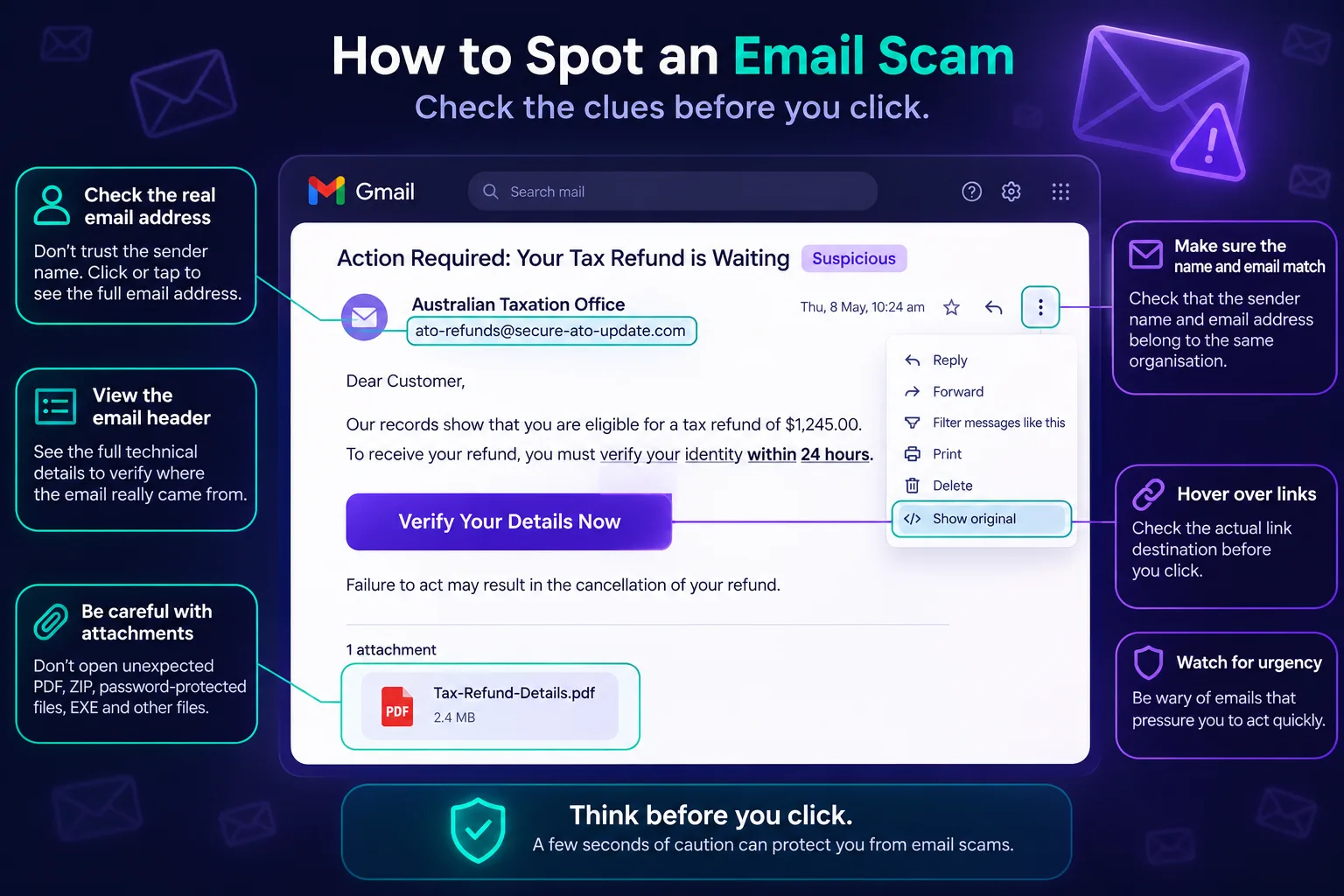
A link can be one of the most dangerous parts of a scam message.
You might receive a message saying:
“Your parcel could not be delivered. Update your address here.”
Or:
“Your bank account requires KYC verification. Click here.”
The message may contain the company’s logo and use professional-looking language. But clicking the link could take you to a fake website designed to collect your password, card details, OTP or other information.
The safest approach for important accounts is often to skip the link entirely.
If your bank supposedly needs you to do something, open the official banking app yourself. If a shopping website says there is an issue with your order, open the retailer’s official app or website rather than following an unexpected link.
Be particularly careful with shortened URLs, unfamiliar domains, spelling variations and addresses that look almost—but not quite—like the genuine website.
If you aren’t sure where a link leads, you can check a suspicious URL with Phishbowl’s URL Checker before opening it.
RBI guidance similarly advises users not to click suspicious links received through SMS, email or social media and to use verified and trusted websites for online banking.
4. Never share OTPs, PINs or authentication codes
An OTP can look like just another six-digit number, but in many situations it is effectively a temporary key to an account or transaction.
Never share an OTP, UPI PIN, card PIN, CVV, password or authentication code with someone simply because they claim to be helping you.
This includes people claiming to be from:
- Your bank
- A payment company
- Customer support
- A government department
- A courier company
- A telecom provider
- A marketplace
- Technical support
A scammer may already know your name, phone number or other details. That doesn’t make the request genuine.
In some scams, the criminal deliberately triggers a legitimate OTP from the victim’s bank or service and then asks the victim to read the code back to them.
RBI’s consumer guidance is clear: customers should not share passwords, PINs, OTPs, CVVs or UPI PINs with anyone.
If someone asks you for an authentication code, stop and ask yourself why they need a code that was sent to you rather than to them.
5. Understand what you’re actually approving in UPI
UPI has made sending and receiving money extremely convenient, but that convenience can also be exploited by scammers.
One common trick involves convincing someone that they need to approve a payment request or enter their UPI PIN in order to receive money.
That’s not how receiving money works.
You do not need to enter your UPI PIN to receive money.
If you enter your UPI PIN to approve a payment request, you are authorising a transaction from your account. RBI specifically warns about fraudsters who pose as buyers and persuade sellers to approve a UPI request while claiming that the seller is receiving money.
Before approving any UPI transaction, stop and look carefully at what the screen is asking you to authorise.
Check:
- Is money being sent or received?
- Who is the recipient?
- How much money is involved?
- Did you initiate this transaction?
- Why are you being asked to approve it?
If something doesn’t make sense, don’t approve it.
6. Be cautious with QR codes and payment requests
QR codes have become part of everyday life. You can find them on restaurant tables, shop counters, invoices, websites, social media and messages.
But a QR code isn’t automatically trustworthy simply because it is convenient to scan.
A QR code can direct you to a website, open an application, initiate a payment or perform another action depending on how it is configured.
Be particularly careful when someone unexpectedly sends you a QR code and asks you to scan it to receive money, a refund, a prize or a payment.
Before scanning, consider where the code came from and what you’re being asked to do after scanning it.
And remember the important distinction:
Scanning a QR code to make a payment is very different from scanning one to receive money.
RBI specifically advises consumers not to scan QR codes or click links received from unknown sources and notes that entering a PIN or OTP isn’t required to receive money.
If you’re unsure about a QR code, you can check it with Phishbowl’s QR Code Scanner before proceeding.
7. Think twice before installing an unfamiliar app
An app can have far more access to your phone than a website does.
That’s why you should be especially careful when someone asks you to install an app to:
- Receive a refund
- Complete KYC
- Track a payment
- Fix a banking problem
- Get customer support
- Receive a parcel
- Earn money
- Complete a job
- Access an investment opportunity
Never install an application simply because someone on a call or in a message tells you that you need it.
Be cautious about apps downloaded from links in messages or websites rather than from official app stores. Even an app that appears professional should be examined before giving it access to sensitive information or device functions.
Look at the developer, reviews, permissions and other available information. Be particularly suspicious when an app requests permissions that don’t seem necessary for what it claims to do.
If you’ve been sent an unfamiliar app or are considering installing one from Google Play Store, Phishbowl’s App Risk Checker can help you examine potential risks before you proceed.
8. Don’t give strangers remote access to your phone
Some scams don’t start with a suspicious link or payment request. They start with a phone call.
A supposed support representative may tell you that they need to “fix” your phone, help with a refund, verify your account or investigate suspicious activity.
They may then ask you to install a remote-access or screen-sharing application.
Once you give someone remote access, you may be allowing them to see what is happening on your device and potentially interact with applications while you’re using them.
Never give an unknown person remote access to your phone or computer simply because they claim to be from a trusted organisation.
If you genuinely need technical support, contact the company yourself using its official website or app and follow its support process.
The same principle applies to screen sharing: don’t let someone you haven’t independently verified watch you enter passwords, OTPs, banking information or payment details.
9. Protect your accounts even when nobody is trying to scam you
Scam prevention isn’t only about spotting suspicious messages.
Your accounts should be protected before a scammer ever contacts you.
Use strong, unique passwords for important accounts and enable two-factor authentication or other additional security features wherever available.
Keep your phone, operating system and applications updated. Turn on transaction alerts from your bank and payment services so that you can spot unusual activity quickly.
It’s also worth periodically reviewing the applications installed on your phone and the permissions you’ve granted them.
If an old application no longer needs access to your contacts, microphone, camera, location or other sensitive information, consider removing that access or uninstalling the app.
And if you’re concerned that your email address or other information may have appeared in a data breach, Phishbowl’s Breach Alert available on the app can help you check for exposed information.
The goal isn’t to make your phone or accounts completely risk-free. It’s to make sure that a single deceptive message doesn’t automatically give someone access to everything else.
10. If something goes wrong, act quickly
Even careful people can get scammed.
You might click a link before noticing something is wrong. You might accidentally approve a payment. You might provide information to someone you later realise was impersonating another person or organisation.
If this happens, don’t spend hours blaming yourself or trying to work out exactly what happened before taking action.
Act quickly.
If money has been transferred through a fraudulent transaction, contact your bank or payment provider immediately. In India, financial cyber fraud can also be reported through the 1930 cybercrime helpline and the National Cyber Crime Reporting Portal.
Preserve anything that could help document what happened:
- Screenshots
- Transaction IDs
- UPI IDs
- Phone numbers
- Emails
- Website addresses
- WhatsApp or Telegram messages
- App names
- Payment details
- Any other communication with the scammer
Don’t delete the conversation simply because it is upsetting or embarrassing. It may contain useful evidence.
If you’ve already lost money or shared sensitive information, read our guide on what to do if you’ve been scammed and how you may be able to recover your money for the steps you should take next.
A simple rule: pause, verify, then act
You don’t need to recognise every scam in existence to stay safer online.
Instead, build a habit of stopping before you take an action that could expose your money, accounts or personal information.
Before you click, pay, scan, install or share, ask:
Was I expecting this?
Do I know who is actually asking?
Can I verify it independently?
Am I being rushed?
What exactly am I approving or giving access to?
If you can’t confidently answer those questions, don’t proceed yet.
A few seconds of caution can be enough to prevent a much bigger problem.
Pause. Verify. Then act.
SPONSORED